
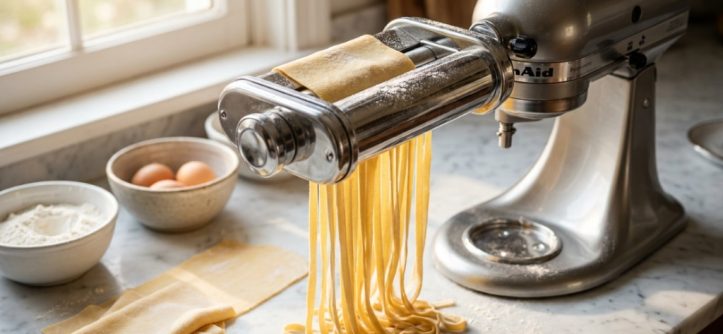
You’ve seen the glossy videos of fresh fettuccine cascading out of a stand mixer, and you’re ready to upgrade your homemade pasta game. But before you hit “add to cart,” a critical question looms: will that Antree attachment actually fit your specific mixer model? The last thing you want is a box of shiny steel gears that doesn’t connect to your machine. This guide cuts through the guesswork, explaining exactly how to verify antree pasta attachment kitchenaid compatibility, what to check before buying, and how to avoid the common mistakes that lead to wasted money and frustration.
Key Takeaways
- Antree pasta attachments are designed primarily for standard KitchenAid tilt-head and bowl-lift mixers, but not all models are guaranteed to fit.
- You must verify your mixer’s exact model number and hub type before purchasing, as older or mini models may have different connection points.
- The attachment includes three cutting rollers (fettuccine, spaghetti, and lasagna), but the quality of the pasta dough significantly affects the final result.
- While the Antree is a budget-friendly alternative to the KitchenAid brand attachment, it has notable differences in build materials and long-term durability.
- Check the hub’s inner diameter and the mixer’s power rating to ensure the motor can handle the resistance of rolling stiff pasta dough.
Understanding the Antree Pasta Attachment Design
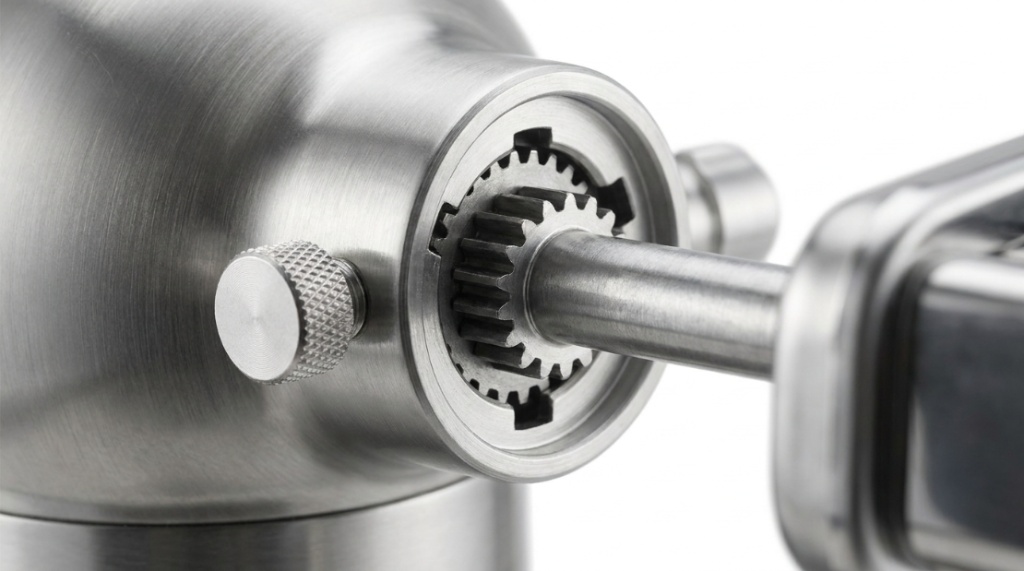
The Antree 3-in-1 pasta maker attachment is a popular accessory that mimics the function of the official KitchenAid pasta roller set. It connects to the mixer’s power hub—the small, circular socket on the front of the machine—rather than using the top port where the bowl sits. This is a crucial distinction because it means the attachment relies on the mixer’s internal gearing to rotate the rollers.
When we talk about antree pasta attachment kitchenaid compatibility, we are specifically referring to the physical connection between the attachment’s drive shaft and the mixer’s hub. If the shaft is too short, too long, or the wrong shape, the rollers won’t spin. The Antree unit is engineered to fit the standard hub size found on most modern KitchenAid models, but there are exceptions that you need to be aware of before you commit to the purchase.
The Standard Hub Connection
Most KitchenAid stand mixers manufactured in the last 30 years use a standard-sized power hub. This includes the popular Artisan (tilt-head) series and the Pro (bowl-lift) series. The Antree attachment is built to slide directly into this hub. You simply remove the small metal cap covering the hub, insert the attachment’s shaft, and tighten the knob to lock it in place. This is the same mechanism used by the official KitchenAid attachments, which is why the Antree is often marketed as a direct replacement.
However, “standard” does not mean “universal.” If you own a KitchenAid Mini (3.5-quart) model, the hub is physically smaller and uses a different drive mechanism. The Antree attachment will not fit these compact machines. Similarly, very old vintage mixers from the 1960s and 1970s may have a different hub design that is incompatible with modern accessories.
How to Verify Your Mixer Model
You cannot rely on the color of your mixer or the year you bought it to determine compatibility. You must check the model number. This is printed on a silver or white sticker located on the underside of the mixer’s base. Flip your machine over and look for a series of numbers and letters (e.g., KSM150, KSM75, K5SS).
Once you have this number, you can cross-reference it with the Antree product listing. Most listings will explicitly state which models are supported. If the listing only says “for KitchenAid,” you need to dig deeper. Look for specific model numbers in the product description or customer Q&A section. If you have a bowl-lift model like the Pro 600 or the Commercial series, you are likely fine. If you have a tilt-head model like the Artisan or Classic, you are also likely fine, provided it is not the Mini version,If you want to upgrade your kitchen tools for better homemade results, check out why the stainless steel pasta roller is a must-have for pasta lovers to speed up your prep work.
Checking the Hub Diameter
Even if your model number seems correct, it is wise to physically measure the hub opening. The standard hub has an inner diameter of approximately 1.25 inches. The Antree attachment’s shaft is designed to fit this exact dimension. If you have a caliper or a ruler, measure the opening on the front of your mixer. If it is smaller than 1.25 inches, the attachment will not fit. This is a simple check that takes less than a minute and can save you the hassle of a return.
Comparing Antree vs. KitchenAid Brand Attachments
Understanding the differences between the Antree and the official KitchenAid attachment helps you make an informed decision beyond just the price tag. The Antree is significantly cheaper, but that cost savings comes with trade-offs.
| Feature | Antree 3-in-1 Attachment | KitchenAid Brand Attachment |
|---|---|---|
| Price | Budget-friendly (typically $40–$60) | Premium (typically $100–$150) |
| Material | Stainless steel rollers with plastic housing | All-metal construction (steel and aluminum) |
| Included Cutters | Fettuccine, Spaghetti, Lasagna | Fettuccine, Spaghetti, Lasagna |
| Durability | Good for occasional home use | Designed for heavy, frequent use |
| Warranty | Varies by seller (often 12 months) | 1-year limited warranty |
| Roller Adjustment | Knob with 9 thickness settings | Knob with 9 thickness settings |
The plastic housing on the Antree is the primary concern for long-term durability. While the rollers that touch the dough are stainless steel, the outer casing that holds the gears is plastic. If you plan to make pasta every week, the plastic gears may wear out faster than the metal gears in the KitchenAid version. However, for a home cook who makes pasta once a month, the Antree offers excellent value.
Step-by-Step Installation Guide
Once you have confirmed that your mixer is compatible, installation is straightforward. Here is how to attach the Antree unit correctly to avoid damaging your mixer or the attachment.
- Turn off and unplug the mixer. Never attach accessories while the mixer is plugged in.
- Remove the hub cap. This is the small metal or plastic cover on the front of the mixer. Turn it counter-clockwise to loosen it.
- Insert the attachment shaft. Align the square-shaped end of the Antree’s drive shaft with the square socket inside the mixer’s hub.
- Push firmly and tighten. Push the attachment in until it sits flush against the mixer. Then, tighten the knob on the attachment clockwise until it is snug. Do not over-tighten, as this can strip the threads.
- Set the roller width. Turn the knob on the side of the attachment to the widest setting (usually “1”) before you start feeding dough.
- Test the rotation. Plug the mixer in and turn it to speed “2.” The rollers should spin smoothly. If they wobble or make a grinding noise, stop immediately and re-check the connection.
Common Installation Mistakes
One of the most common errors is failing to push the attachment in all the way. If the shaft is not fully seated in the hub, the gears will not engage, and the rollers will remain stationary while the motor runs. Another mistake is using a speed higher than “2.” Pasta dough is stiff, and running the attachment at high speed can overheat the mixer’s motor and damage the plastic gears in the Antree unit. Always use the lowest speed setting for mixing and rolling.
Dough Consistency and Performance
Even with a perfect fit, the Antree attachment will only perform as well as your dough. This is where many users get frustrated and blame the tool when the real issue is the recipe. Pasta dough for a roller attachment must be drier than dough made for hand-rolling. It should feel like slightly crumbly sand that comes together into a cohesive sheet when pressed.
If your dough is too wet, it will stick to the rollers and clog the cutter. If it is too dry, it will crumble and produce ragged sheets. The ideal hydration for machine-rolled pasta is around 50% (e.g., 200 grams of flour to 100 grams of egg). You should knead the dough for at least 8–10 minutes until it is smooth and elastic, then let it rest for 30 minutes before rolling.
Feeding the Dough Through the Rollers
Start with the rollers on the widest setting. Flatten the dough into a rough rectangle with your hands, then feed it through the rollers. Catch the sheet as it comes out the other side, fold it into thirds, and run it through again. Repeat this folding and rolling process 3–4 times on the widest setting. This develops the gluten and creates a smooth, silky texture. Only then should you begin narrowing the roller setting, moving down one number at a time until you reach your desired thickness.
Maintenance and Cleaning Best Practices
Proper cleaning is essential for the longevity of your Antree attachment. The worst thing you can do is submerge the entire unit in water. The internal gears and bearings will rust or seize up, rendering the attachment useless.
- Brush off excess flour. Use a dry pastry brush or a stiff nylon brush to remove flour and dough residue from the rollers and cutters.
- Use a toothpick for stuck dough. If dough is lodged in the cutter grooves, use a wooden toothpick to gently poke it out. Never use metal tools, which can scratch the rollers.
- Wipe with a damp cloth. For stubborn residue, wring out a cloth in warm water and wipe the rollers. Do not use soap, as it can leave a residue that affects the taste of future pasta.
- Dry immediately. Moisture is the enemy. Dry the attachment thoroughly with a towel and leave it out to air-dry for an hour before storing it.
- Store in a dry place. Keep the attachment in its original box or a sealed plastic bag to prevent dust and humidity from corroding the metal.
Frequently Asked Questions
Will the Antree attachment fit a KitchenAid Artisan Mini?
No. The KitchenAid Artisan Mini (KSM3311) has a smaller, non-standard power hub. The Antree attachment is designed for full-size tilt-head and bowl-lift models only.
Can I use the Antree attachment with a Cuisinart or Bosch mixer?
No. The Antree attachment is specifically engineered for KitchenAid’s hub system. It will not fit other brands unless they explicitly state they use a KitchenAid-compatible hub, which is rare.
Does the Antree attachment come with a cleaning brush?
Most listings include a small cleaning brush, but this varies by seller. Check the product photos and description carefully. If a brush is not included, a standard bottle brush or pastry brush works well.
Why is my pasta coming out wavy or torn?
This is usually a dough hydration issue. The dough is likely too wet. Add more flour and knead it in until the dough is firm and only slightly tacky. Also, ensure you are dusting the dough with flour before feeding it through the cutter.
Is the Antree attachment dishwasher safe?
No. The plastic housing and metal gears will be damaged by the heat and water pressure of a dishwasher. You must clean it by hand with a dry brush.
Conclusion
Deciding whether the Antree pasta attachment fits your mixer comes down to checking your specific model number and hub size. For owners of standard full-size KitchenAid mixers, this attachment offers a fantastic entry point into fresh pasta making without the premium price tag of the brand-name accessory. The key to success lies not just in the fit, but in your dough preparation and maintenance habits. If you have a standard mixer and are willing to hand-wash the attachment and use the correct dough consistency, the Antree is a smart, budget-conscious purchase. If you own a Mini or a non-KitchenAid brand, you will need to look elsewhere. Take the time to verify your model today, and you will be rolling fresh pasta sheets in no time.